
一、关于易智财富 1. About Easy Wealth
易智财富(Easy Wealth)是一款 AI 驱动的家庭财务决策平台,定位是家庭 AI CFO——把脉看护,巡航预诊。它由三部分组成:持续运行的 AI 账务、一组 AI 分析工具、以及把两者串起来的报告与提醒。
与一次性计算器不同,易智财富的核心是连续性:您的收支流水、保单与账户资料、历次评估结论都留在同一个账户里,越用越准。
平台独立运营:不销售保险、证券或年金,不赚取任何产品佣金。商业模式是 SaaS 订阅加按次付费,推荐返利属于软件促销奖励,不是金融佣金。AI 分析与人工销售相互独立——分析结论只服务于您的判断。
创始人为 Yi Gai(易改),方法论基于其著作《积累财富 解读人生》。
1.1 三个主要部分
| 模块 | 做什么 | 本说明章节 |
|---|---|---|
| AI 账务 | 连接银行自动同步,或一句话、拍照、导入对账单记账;AI 分类、家庭与公司分账、报税项目归集 | 第二章 |
| 分析工具 | 产品测评、需求分析、IUL / FIA 解读器,以及 8 个可离线使用的理财计算器 | 第三章 |
| 报告与顾问 | 标准化报告存档、通知提醒、按需匹配持牌顾问 | 第三、五章 |
1.2 网页版优先,也可从应用商店安装
易智财富采用 PWA(Progressive Web App,渐进式 Web 应用)技术发布。网页版是功能最完整的版本,也是我们推荐的安装方式;安卓版已在 Google Play 上架,iPhone 版已在 App Store 上架,商店版功能较少,例如不含订阅购买和推荐返利。只需用手机或电脑的浏览器访问 easywealthai.com,按本说明第六至九章把它"添加到主屏幕",即可像普通 App 一样使用。
1.3 PWA 与原生 App 的差异
| 对比项 | 原生 App | 易智财富 PWA |
|---|---|---|
| 获取方式 | App Store / Google Play | 浏览器添加到主屏幕 |
| 更新方式 | 需手动或自动更新版本 | 自动加载最新版,无需手动升级 |
| 占用空间 | 通常数百 MB | 通常 1 - 5 MB |
| 离线访问 | 完全离线 | 已加载页面与计算器可离线使用 |
| 启动入口 | 主屏幕图标 / App 抽屉 | 主屏幕图标(与原生 App 一致) |
| 权限申请 | 安装时审批 | 使用时按需申请 |
1.4 支持的设备
-
iPhone / iPad:iOS 14 及以上,使用 Safari 浏览器;如需接收提醒,需 iOS 16.4 及以上并从主屏图标启动
-
Android 手机:Android 8 及以上,推荐 Chrome 浏览器
-
Windows / Mac 电脑:Chrome、Edge、Safari 最新版
Easy Wealth is an AI-powered financial decision platform for households. Its role is that of a family AI CFO: monitoring your finances continuously and flagging issues early. It has three parts — an always-on AI Ledger, a set of AI analysis tools, and the reports and reminders that tie the two together.
Unlike a one-off calculator, EasyWealth is built on continuity: your transactions, policy and account records, and past assessment results all live in one account, so the analysis gets sharper the longer you use it.
The platform is independent: it does not sell insurance, securities or annuities and earns no product commissions. The business model is SaaS subscription plus pay-per-use, and referral rewards are software promotional credits rather than financial commissions. AI analysis and human sales stay independent — the analysis serves your judgment only.
Founded by Yi Gai; the methodology is built on the book The Logic of Wealth and Life.
1.1 The Three Main Parts
| Module | What it does | Section |
|---|---|---|
| AI Ledger | Connect your bank for automatic sync, or add entries by sentence, photo, or statement; AI categorization, family vs. business books, tax-item collection | Section 2 |
| Analysis tools | Holdings Review, Needs Analysis, IUL / FIA decoders, plus 8 calculators that work offline | Section 3 |
| Reports and advisors | Standardized report archive, notifications, and optional matching with licensed advisors | Sections 3 and 5 |
1.2 Web Version First, Store Apps Optional
EasyWealth is delivered as a Progressive Web App (PWA). The web version is the most complete one and the way we recommend installing it. The Android app is on Google Play and the iPhone app is on the App Store; the store apps have fewer features and leave out subscription purchases and referral rewards. Simply open easywealthai.com in your phone or desktop browser and follow the "Add to Home Screen" steps in Sections 6 to 9. Once installed, it behaves like a native app.
1.3 PWA vs. Native App
| Aspect | Native App | EasyWealth PWA |
|---|---|---|
| How to obtain | App Store / Google Play | Add to Home Screen via browser |
| Updates | Manual or automatic version updates | Always loads the latest version automatically |
| Storage | Typically hundreds of MB | Typically 1 - 5 MB |
| Offline access | Fully offline | Cached pages and calculators work offline |
| Launch | Home screen icon / app drawer | Home screen icon, same as a native app |
| Permissions | Approved at install time | Requested only when a feature needs them |
1.4 Supported Devices
-
iPhone / iPad: iOS 14 or later, using Safari. Push reminders require iOS 16.4 or later and launching from the home screen icon.
-
Android: Android 8 or later, Chrome recommended
-
Windows / Mac: latest Chrome, Edge or Safari
二、AI 账务:记账交给 AI 2. AI Ledger: AI Keeps Your Books
AI 账务是易智财富的主入口,也是家庭 AI CFO 的数据基础。目标只有一个:让 AI 把家庭(以及公司)的收支记清楚,您只需确认它拿不准的几笔,并把报税相关项目自动归集起来。
登录后,从左侧功能栏第一项"AI 账务"进入,或直接访问 easywealthai.com/ledger/。
2.1 四种记账方式
| 方式 | 怎么用 | 适合场景 |
|---|---|---|
| 一句话记账 | 在"今日账务"卡片里直接输入,例如"午餐 星巴克 8 块,加油 45";支持中英文,可一次记多笔 | 现金、微信、零星支出 |
| 语音输入 | 点"语音输入",或用手机键盘上的麦克风按钮口述 | 开车后、走路时随口记一笔 |
| 拍照记账 | 点"拍照记账",上传收据照片或付款截图,AI 识别商家、金额与日期 | 纸质收据、餐厅小票 |
| 对账单导入 | 底部工具条"导入",上传银行或信用卡对账单(PDF / CSV)批量入账 | 补录历史月份、未连接的账户 |
此外还有第五种、也是最省事的一种:连接银行自动同步,见下一节。
2.2 连接银行账户(自动同步)
操作步骤
-
① 进入 AI 账务页面,在记账卡片右上角点击"连接银行账户"
-
② 在弹出的 Plaid 授权窗口中搜索并选择您的银行,用网银账号登录并完成验证
-
③ 授权成功后,系统会自动为该银行下的每个账户建立档案(支票、储蓄、信用卡、贷款等自动识别)
-
④ 首次授权后请稍等约半分钟,再点"立即同步"拉取首批流水
关于安全
-
连接由 Plaid 提供。Plaid 是美国主流的银行数据聚合服务,被大量主流金融应用采用
-
授权为只读:只能读取账户与交易信息,无法发起任何转账或扣款
-
您的网银用户名与密码直接提交给 Plaid 与银行,易智财富不接触、不保存
-
授权令牌在我们的数据库中加密存储
-
连接列表中每一行都提供"断开"按钮,随时可以解除授权;断开后已入账的历史记录仍然保留
提示:Plaid 授权窗口目前仅提供英文界面,这是 Plaid 的限制,与您在易智财富内选择的语言无关。
只记已入账的交易。银行自动同步只记录银行已正式入账的交易,尚在处理中的(待入账)会先跳过,通常一到两个工作日后自动出现,这样同一笔交易不会先后被记两次。存款暂扣、解除暂扣这类银行备注不是资金进出,不会入账。银行撤销已入账的交易时,系统会把它从账本移除(存档保留)并通过铃铛通知您。
2.3 待确认队列——只需您判断的那几笔
每一笔进入系统的交易,AI 都会判断三件事:方向(收入还是支出)、类别(餐饮、油费、房租……)、是否报税相关。
-
判断把握足够高的,直接入账,不打扰您
-
把握不足、或涉及需谨慎处理的类别,进入待确认队列,等您看一眼
-
您在快捷记账时自己选定了类别的,视为已确认,直接入账
首页上那句"N 笔交易需要你看一眼(约 10 秒)"就是这个队列。点进去后,每一行可以同时修改三项:方向、类别、归属账本,改完确认即入账。
越用越省事:您的每一次修正都会被系统记住,同一商家下次出现时会自动归到正确类别。所以新账号刚连上银行时待确认较多属于正常现象,确认几轮之后自动入账的比例会明显上升。
2.4 家庭与公司分账(主体归属)
如果您有自雇收入、出租房或小生意,可以在同一个账户下把"家庭"与"公司"的账目分开,而不必注册两个账号。
-
按连接一次性设定:在银行连接列表中,为每个连接选择一次"归属"。该连接下所有账户的新交易会自动继承这个归属,已在队列中的存量交易也会一并打标
-
导入时指定:上传对账单时可选择归属;不选则沿用该账户的既有绑定
-
单笔改派:在待确认页或流水页可以逐笔调整,选"家庭"即划回家庭账本;手工改派过的记录不会被自动继承覆盖
归入公司账本的支出会按 Schedule C 的科目归集,方便年底整理。
套餐限额:专业版含 1 个企业账本(适用 Schedule C 的自雇或单人 LLC);商务版含 3 个,并支持 S-Corp 与合伙企业,可导出 1120-S 与 1065 底稿。升级或降级不影响已建账本,仅限制新建。若要把账本交给会计师或顾问协助管理,见第六章 · 授权与协作。
2.5 本月概况、月报与固定收支
-
本月概况:首页显示收入、支出、净现金流、可报税相关四项
-
底部工具条:流水(全部历史交易)、月报(按月汇总与结构分析)、导入(对账单)、固定收支、待确认
-
固定收支:登记房租、保费、订阅、月供等周期性项目后,系统会自动匹配对应流水,减少重复确认。建议在初次使用时花 3 分钟完成这一步,之后 AI 就能接管大部分固定支出
报税相关项目仅为记录归集,不构成税务建议,请咨询您的 CPA 确认。平台只汇总金额,不办理工资单、941、W-2 等申报事务。
2.6 动态监测
动态监测每天在银行同步之后检查一遍您的账本,只在需要您留意时提醒。入口有两个:账务首页的「动态监测」卡片,以及点「查看全部」进入的动态监测页。切换家庭或公司账本,监测内容随之切换。
预算执行。系统按过去三个月已确认支出的中位数,为每个一级类别算好建议预算,您确认或微调后保存即可,不需要从零填写。进度条上的竖线是进度线,表示按今天的日期应当花到的位置:在线内为正常,超过进度线为花得偏快,达到九成为接近上限,超过预算为已超支。待确认的交易不计入,单独列出。
风险提示。异常大额支出、首次付给新收款方的大额款项、连续两个月入不敷出、收入明显下滑、保费等大额定期支出即将到期、活期与储蓄合计不足三个月支出。
漏洞防堵。疑似重复扣款、银行手续费与罚息、定期扣费涨价、新增订阅、信用卡还款被重复计入支出、手工记账与银行同步重复入账。
处理提醒。每条提醒可以「去查看」对应交易、「忽略」,或选择「不再提醒此类」,系统按商家、类别或这一对交易记住您的选择。问题消除后提醒会自动转为已处理,例如删掉了重复的那一笔。信用卡还款重复计入的提醒带有「一键改为划转」,执行后可以在「已处理」里撤销,您此后手工改过的交易不会被撤销覆盖。只有警示级的新事件会推送到铃铛。
订阅清单。列出按月重复的扣费及年度合计。银行流水看不出订阅是否还在使用,是否取消由您判断。
2.7 智能提醒与通知
-
有待确认交易、银行同步完成或月度小结时,系统会通过站内通知提醒您——即页面右上角的铃铛;无事不打扰
-
点击铃铛可查看通知列表,条目可直接跳转到对应页面;全部已读后红点熄灭
-
iPhone 用户:需先按第八章把 App 添加到主屏幕,并从主屏图标打开,才能开启推送提醒;系统需 iOS 16.4 及以上
The AI Ledger is the main entry point of EasyWealth and the data foundation of your family AI CFO. It has one goal: let AI keep your family (and business) income and expenses straight, so you only confirm what it is unsure about, with tax-related items collected automatically.
After signing in, open "AI Ledger" — the first item in the left sidebar — or go directly to easywealthai.com/ledger/.
2.1 Four Ways to Record
| Method | How to use it | Best for |
|---|---|---|
| One-sentence entry | Type straight into the "Today's Ledger" card, e.g. "lunch Starbucks 8, gas 45". English or Chinese; several items at once. | Cash and small everyday spending |
| Voice | Tap "Voice", or dictate using the microphone key on your phone keyboard | Recording on the go |
| Photo entry | Tap "Photo entry" and upload a receipt photo or payment screenshot; AI reads merchant, amount and date | Paper receipts and restaurant checks |
| Statement import | Tap "Import" in the bottom bar and upload a bank or credit card statement (PDF / CSV) for bulk entry | Backfilling past months, or accounts you have not connected |
There is a fifth and easiest option as well: connect your bank for automatic sync, described next.
2.2 Connecting a Bank Account (Automatic Sync)
Steps
-
① Open the AI Ledger page and tap "Connect bank" at the top right of the entry card
-
② In the Plaid window, search for your bank and sign in with your online banking credentials
-
③ Once authorized, an account record is created for every account at that institution — checking, savings, credit card and loan types are detected automatically
-
④ Wait about half a minute after the first authorization, then tap "Sync now" to pull in your first batch of transactions
About security
-
The connection is provided by Plaid, a widely used US bank data aggregation service behind many mainstream financial apps
-
Access is read-only: account and transaction data can be read, but no transfer or payment can ever be initiated
-
Your online banking username and password go directly to Plaid and your bank. EasyWealth never sees or stores them.
-
Access tokens are stored encrypted in our database
-
Every row in the connection list has a "Disconnect" button. Disconnecting revokes access; transactions already recorded stay in your ledger
Note: the Plaid authorization window is currently available in English only. This is a Plaid limitation and is unrelated to the language you select in EasyWealth.
Only posted transactions are recorded. Automatic bank sync records only transactions your bank has posted. Pending ones are skipped and appear on their own once they post, usually within one or two business days, so the same transaction is never recorded twice. Bank memos such as deposit holds and hold releases are not money movements and are not recorded. If your bank reverses a posted transaction, it is removed from your ledger (an archived copy is kept) and you are notified through the bell.
2.3 The Review Queue — Only What Needs You
For every transaction that enters the system, the AI decides three things: direction (income or expense), category (dining, fuel, rent and so on), and whether it is tax-related.
-
When confidence is high enough, the transaction is booked directly and you are not interrupted
-
When confidence is low, or the category calls for care, it goes into the review queue for a quick look
-
If you chose the category yourself during quick entry, it is treated as confirmed and booked directly
The line on the home page reading "N transactions need a quick look (~10s)" is this queue. Inside, each row lets you adjust three things at once: direction, category and book. Confirm and it is recorded.
It gets easier: every correction you make is remembered, and the same merchant is categorized correctly next time. A high number of pending items right after connecting a new bank is normal; after a few rounds of confirmation, the share of auto-booked transactions rises noticeably.
2.4 Family vs. Business Books
If you have self-employment income, a rental property or a small business, you can separate family and business records inside one account instead of registering twice.
-
Set once per connection: choose the owner for each bank connection in the connection list. New transactions from all accounts under it inherit that assignment, and pending items already in the queue are tagged as well
-
Set at import: choose the owner when uploading a statement; leave it blank to follow the account's existing assignment
-
Reassign one transaction: adjust individual rows from the review or history page. Choosing "Family" moves it back to the family book, and manual reassignments are never overwritten by automatic inheritance
Expenses in the business book are collected under Schedule C line items, which makes year-end preparation easier.
Plan limits: Pro includes one business book, which suits a sole proprietor or single-member LLC filing Schedule C. Business includes three and supports S-Corps and partnerships, with 1120-S and 1065 worksheets available. Changing plan does not affect books you already have; only new creation is limited. To invite an accountant or advisor into a book, see Chapter 6 · Access & Sharing.
2.5 This Month, Reports and Recurring Items
-
This Month: the home page shows income, expenses, net cash flow and tax-related totals
-
Bottom bar: History (all transactions), Report (monthly summary and structure), Import (statements), Recurring, and Review
-
Recurring: register rent, premiums, subscriptions and loan payments once, and matching transactions are recognized automatically, cutting repeat confirmations. Spending three minutes on this at the start lets the AI take over most of your fixed spending
Tax-related items are collected for record-keeping only and are not tax advice — please confirm with your CPA. The platform aggregates amounts only; it does not process payroll, Form 941 or W-2 filings.
2.6 Monitoring
Monitoring checks your ledger every day after bank sync and speaks up only when something needs your attention. You'll find it in two places: the Monitoring card on the AI Ledger home page, and the Monitoring page behind View all. Switching between family and business books switches what it shows.
Budgets. The system suggests a budget for each top-level category from the median of your last three months of confirmed spending. Confirm or adjust it and save — no need to start from scratch. The vertical mark on each bar is the pace line, showing where spending should be by today: within it is on track, past it is ahead of pace, 90% is near the limit, and above 100% is over budget. Pending transactions are not counted and are shown separately.
Risk alerts. Unusually large expenses, a first large payment to a new payee, spending above income two months in a row, a clear drop in income, large recurring payments such as premiums coming due, and checking plus savings below three months of spending.
Money leaks. Possible duplicate charges, bank fees and penalty interest, recurring charges that went up, new subscriptions, credit card payments counted twice, and manual entries that duplicate bank transactions.
Handling alerts. Each alert lets you Review the transactions, Dismiss it, or choose Don't remind me again, which is remembered by merchant, category, or that pair of transactions. Alerts move to Handled on their own once the problem is gone, for example after you delete a duplicate. The alert for double-counted card payments offers Mark as transfers, which you can undo under Handled; any transaction you edited afterwards is left as you set it. Only new warning-level events are pushed to the bell.
Subscriptions. A list of charges that repeat monthly, with their yearly total. Bank data can't tell whether you still use a subscription, so whether to cancel is your call.
2.7 Smart Reminders and Notifications
-
When transactions are waiting for review, a bank sync completes, or a monthly summary is ready, you are notified through the bell at the top right of the page — and left alone otherwise
-
Tap the bell to see the list; each item links to the relevant page, and the red dot clears once everything is read
-
iPhone users: add the app to your home screen as described in Section 6 and open it from that icon before enabling push reminders. iOS 16.4 or later is required.
三、分析工具与报告 3. Analysis Tools & Reports
平台共 14 个工具,统一入口在 App 中心(easywealthai.com/app)。其中 12 个拥有独立子域、可以单独安装(见第十一章):核心分析 4 项与理财计算器 8 项。AI 账务位于主站 /ledger/ 路径下,不是子域,产品对比位于 /check/compare.html,也不是子域,所以工具总数 14、子域 12。
3.1 核心分析(需登录)
| 工具 | 做什么 | 入口 |
|---|---|---|
| 产品测评 | 上传保单、年金、IRA、401(k) 等持有资料,AI 按五维标准(成长性、风险、流动性、管理成本、税务)评分,找出隐藏问题与优化空间 | holdings.easywealthai.com |
| 人生画像(需求分析) | 量化保障缺口、退休目标与教育金需求,约 5 分钟生成个性化蓝图 | needs.easywealthai.com |
| 万能寿险(IUL)解读器 | 看懂任意 IUL 保单的真实结构、成本与长期可持续性 | iul.easywealthai.com |
| 指数年金(FIA)解读器 | 对比年金产品的封顶率、参与率、保底与收入分配价值 | fia.easywealthai.com |
同类产品对比
在「我的产品」里勾选 2 到 3 份同类产品(寿险与寿险:IUL、终身寿、UL、VUL;年金与年金:FIA、MYGA、VA),点底部的「对比所选」,即生成对比报告。第一次对比时系统要读取计划书的逐年表,每份约 1 分钟。
报告依次是:决策卡(可比性等级 A、B、C,最关键的发现,按目标说明哪一份更合适);A 产品对产品(可比性检查、参数、现金价值与身故保障曲线、关键年龄、退休领取与领完后的剩余价值、收益率、理财五维、各自的优点与短板);B 放到你家里看(保费占家庭结余的比例、保障缺口与应急金,需要 AI 账务与需求分析的数据);C 压力测试(维持领取所需的最低计息率、更低利率下的失效年龄,并用计划书自带的情景校准误差);D 下一步(建议向保险公司索取的补充演示、选定后如何记录与跟踪)。
数字由程序从计划书逐年表计算,AI 只写解读,每个数字都经过核对。报告按目标说明各产品适合的情形,不推荐购买。年龄为保单年度末年龄。每份报告用 1 次报告额度,同一组产品重复打开或切换中英文不再扣。报告可下载 PDF 或发到注册邮箱,历史报告在「我的对比报告」。
3.2 理财计算器(8 项,无需登录,可离线)
| 工具名称 | 子域地址 | 功能说明 |
|---|---|---|
| 房贷月供 | mortgage.easywealthai.com | 月供、总利息、提前还款方案计算 |
| 投资复利 | invest.easywealthai.com | 复利增长、管理费与资本利得税拆分模型 |
| 退休储蓄 | retire.easywealthai.com | 退休年限、目标储蓄与提取率分析 |
| 529 基金 | 529.easywealthai.com | 美国 529 教育账户规划与州税收减免估算 |
| 紧急备用金 | emergency.easywealthai.com | 应急储备金额建议(3 - 12 个月开支) |
| 债务清偿 | debt.easywealthai.com | 债务雪球法与雪崩法对比方案 |
| 社保估算 | ssa.easywealthai.com | 美国社保领取年龄与金额优化 |
| 人寿测算 | life.easywealthai.com | 人寿保险需求快速测算 |
这 8 项为纯前端计算,不上传数据、不需登录,安装后可离线使用。
3.3 报告中心
每次完成评估后,系统会生成一份标准化决策报告并保存在您的账户中。在左侧"用户总览"或报告入口中可以查看历史报告、按工具或日期筛选、下载 PDF 副本,也可以分享给您的顾问。
3.4 我的报告与历史版本
从用户总览进入「我的报告」页,这里集中列出您的综合报告与历史版本。需求分析的结果已并入综合报告,可以在线查看,也可以下载保存;免责声明在报告末尾。
每次重新做需求分析都会生成新版本,原来的报告保留为历史版本,可以切换查看、加备注;旧版本可以删除,最新版本不能删。同一份分析数据只扣一次报告额度,反复打开不重复扣,数据变化生成新版本时才再计一次。
3.5 AI 助手
页面内的 AI 助手可以回答产品与功能问题,也可以就您已录入的资料做解释性说明。AI 助手提供的是分析与说明,不构成投资、税务或法律建议,也不代表任何销售推荐。
朗读回答:点 AI 助手对话框顶部的喇叭图标,变成金色后,回答会用设备自带的语音读出来,再点一次关闭;在网页版用麦克风按钮提问时,回答会自动朗读。语音提问:电脑和安卓的网页版可用输入框旁的麦克风;iPhone 和 App 里请用键盘上的麦克风(系统听写)。iPhone 静音模式下可能听不到朗读。在 App 内问订阅或价格,AI 助手会请您查看官网 easywealthai.com。
3.6 专项检查
专项检查页针对一个具体问题,都在 easywealthai.com/check/ 下,共九页:IUL 与终身寿险失效体检、签单前计划书对比、年金划不划算、保额够不够、社安金几岁领、退休钱够不够、报税资料清单、家庭财务体检,以及供顾问使用的顾问保单审查。App 首页的「产品对比」进入的就是签单前计划书对比。
保额、社安金、退休、报税清单和家庭体检不登录也能先看结果;登录后结果保存到人生画像,并显示完整分析。报税清单登录后,当年有账务交易时可以直接下载报税包。需要上传计划书的三页注册后使用,初步结论免费,完整报告用 1 次报告额度。
人生画像、综合报告和各专项页用同一套算法:保额按需求逐项计算(债务、收入替代、子女教育、身后费用,减去可动用资产与已有保额);家庭财务体检与综合报告是同一个引擎、同一套评分。
There are 13 tools in all, reachable from the App hub (easywealthai.com/app). Twelve of them have their own subdomain and can be installed standalone (see Section 9): four core analyses and eight calculators. The AI Ledger lives on the main site under /ledger/ and is not a subdomain — Compare Plans lives at /check/compare.html and is not a subdomain either, hence 14 tools but 12 subdomains.
3.1 Core Analysis (sign-in required)
| Tool | What it does | Address |
|---|---|---|
| Holdings Review | Upload policies, annuities, IRAs or 401(k) records; AI scores them on five dimensions — growth, risk, liquidity, cost of management and tax — and surfaces hidden problems and room for improvement | holdings.easywealthai.com |
| Needs Analysis | Quantifies protection gaps, retirement targets and education funding needs, producing a personalized blueprint in about five minutes | needs.easywealthai.com |
| IUL Decoder | Reveals the real structure, cost and long-term sustainability of any IUL policy | iul.easywealthai.com |
| FIA Decoder | Compares annuity caps, participation rates, floors and income value | fia.easywealthai.com |
Product comparison
Under My holdings, tick 2-3 products of the same kind (life with life: IUL, whole life, UL, VUL; annuity with annuity: FIA, MYGA, VA) and tap Compare at the bottom. The first time, we read each illustration's year-by-year table, about a minute each.
The report runs: a decision card (comparability grade A, B or C, the key finding, and which product fits which goal); A, product vs. product (comparability check, key terms, cash value and death benefit curves, key ages, retirement income and what is left afterwards, returns, five dimensions, each product's main strength and weakness); B, your household (premium as a share of your surplus, cover and emergency-fund gaps, using your ledger and needs analysis); C, stress test (the minimum crediting rate needed to sustain income and lapse ages at lower rates, calibrated against the document's own scenario); D, next steps (illustrations to request, and how to record and track your decision).
Figures are computed from the illustration ledgers; AI only writes the narrative and every number is checked. The report explains fit by goal and does not recommend buying. Ages are end-of-policy-year ages. Each report uses 1 report credit; reopening the same set or switching language is free. Download the PDF or email it to yourself; past reports are under My comparisons.
3.2 Calculators (8 tools, no sign-in, offline capable)
| Tool | Subdomain | Description |
|---|---|---|
| Mortgage | mortgage.easywealthai.com | Monthly payment, total interest, prepayment scenarios |
| Compound Growth | invest.easywealthai.com | Compound growth with management fee and capital-gains tax split |
| Retirement | retire.easywealthai.com | Retirement age, target savings and withdrawal-rate analysis |
| 529 Plan | 529.easywealthai.com | US 529 plan modeling with state tax-benefit estimates |
| Emergency Fund | emergency.easywealthai.com | Recommended reserve (3 - 12 months of expenses) |
| Debt Payoff | debt.easywealthai.com | Compare debt snowball vs. avalanche strategies |
| Social Security | ssa.easywealthai.com | US Social Security claiming-age optimization |
| Life Insurance | life.easywealthai.com | Quick life-insurance needs estimate |
These eight run entirely in your browser: nothing is uploaded, no sign-in is needed, and they work offline once installed.
3.3 Reports Center
Every assessment generates a standardized decision report saved to your account. From Overview or the report entry you can browse history, filter by tool or date, download PDFs, and share reports with your advisor.
3.4 My Reports and Earlier Versions
Open My Reports from the Overview to see your comprehensive report and its earlier versions. Needs Analysis results are part of the comprehensive report, which you can read online or download; the disclaimer is at the end.
Each time you redo the Needs Analysis, a new version is created and the previous report is kept; you can switch between versions and add notes. Older versions can be deleted; the latest cannot. One set of analysis data uses one report credit, so reopening a report costs nothing; only a new version counts again.
3.5 AI Assistant
The in-page AI assistant answers product and feature questions and can explain the records you have already entered. It provides analysis and explanation only — not investment, tax or legal advice, and never a sales recommendation.
Reading aloud: tap the speaker icon at the top of the AI assistant panel; when it turns gold, replies are read aloud with your device's built-in voice, and tapping again turns it off. Questions asked with the microphone button on the web are read back automatically. Asking by voice: on the web on computers and Android, use the microphone next to the input box; on iPhone and in the app, use the microphone on the keyboard (system dictation). On iPhone you may hear nothing in silent mode. If you ask about subscriptions or pricing in the app, the assistant points you to our website, easywealthai.com.
3.6 Quick Checks
Quick checks answer one question each and live under easywealthai.com/check/. There are nine: IUL and whole life lapse check, compare quotes before you sign, is your annuity worth it, how much life insurance you need, when to claim Social Security, will your retirement money last, tax document checklist, household financial checkup, and the advisor policy review for advisors. Compare Plans on the App home page opens the compare-quotes check.
Coverage, Social Security, retirement, the tax checklist and the checkup show a result without signing in; signing in saves it to your life profile and shows the full analysis. Signed in, the tax checklist offers a direct tax package download when the year has ledger transactions. The three upload pages need a free account; the first findings are free and the full report uses 1 report credit.
The life profile, comprehensive report and quick checks share one method: cover is worked out item by item (debts, income replacement, college, final expenses, minus usable assets and existing cover), and the household checkup uses the same engine and scoring as the comprehensive report.
四、注册、登录与订阅 4. Sign-Up, Sign-In & Subscription
4.1 注册账户
-
打开易智财富 App(从主屏幕图标启动)或访问 easywealthai.com
-
点击右上角"登录 / 注册"
-
在登录页面点击"注册新账户"
-
填写姓名、邮箱、密码(建议至少 8 位,含大小写字母与数字)
-
选择用户类型:"个人用户"或"金融顾问"
-
查收注册邮箱的验证邮件,点击邮件中的验证链接
-
验证完成后自动跳转回 App
注册不需要提供社会安全号(SSN),您也可以使用化名账户管理自己的财务资料。
4.2 登录已有账户
-
启动 App,点击"登录 / 注册"
-
输入注册邮箱与密码
-
(可选)勾选"30 天内保持登录状态"
-
点击"登录"
4.3 忘记密码
在登录页点击"忘记密码?",输入注册邮箱,系统会发送密码重置邮件(发自 noreply@easywealthai.com)。点击邮件中的链接设置新密码即可。如未收到,请检查垃圾邮件文件夹。
4.4 用户类型
| 用户类型 | 适用人群 | 可访问功能 |
|---|---|---|
| 个人用户(Individual) | 为本人或家庭做财务管理与规划 | AI 账务、核心分析、理财计算器、报告中心、顾问匹配 |
| 金融顾问(Advisor) | 保险经纪人、CFP、注册投顾等持牌专业人士 | 以上全部,另加客户管理、顾问工作台、执业牌照管理与合伙人计划 |
用户类型在注册时选定,后续如需变更可在"账户设置"中申请。
4.5 免费版、试用与订阅
-
免费版(每自然月重置):20 笔手工、语音或拍照记账(其中收据识别 3 张)、1 份综合报告、1 次需求分析、2 次产品测评、5 次 AI 咨询;IUL 与 FIA 解读器、8 个计算器不限次;查看已有账目、历史流水与月报始终不受限制
-
免费试用 30 天:在 AI 账务首页或工具集成页点「开始免费试用」,不需要信用卡,立刻全功能可用。条件是邮箱已验证、每个账号一次。到期前 3 天与 1 天各提醒一次
-
需要订阅或试用的功能:银行自动同步、对账单导入、固定收支、报税资料包、财务报表、动态监测
-
不计入额度:删除自己记错的交易、确认待确认队列、查看任何已有内容
-
按次计入用量:报告生成、产品测评的首次评估、需求分析的首次保存、AI 咨询各自计次。重复保存同一份评估不再重复计次
-
查看余量与方案:在左侧"订阅"中查看当前套餐、剩余次数与账单记录;各档方案的能力与价格见定价页
-
试用或订阅结束后:账户转为免费版,已记录的账目、报告与分析完整保留,仍可继续手工记账;暂停的是自动化部分,订阅后立即恢复
4.1 Creating an Account
-
Launch the EasyWealth app from your home screen, or open easywealthai.com
-
Tap "Login / Sign up" at the top right
-
On the sign-in page, tap "Create new account"
-
Fill in your name, email and password (at least 8 characters with mixed case and numbers recommended)
-
Select your user type: Individual or Advisor
-
Check your inbox for the verification email and click the link
-
After verification you are returned to the app
No Social Security Number is required to register, and you may use an alias account to manage your own records.
4.2 Signing In
-
Launch the app and tap "Login / Sign up"
-
Enter your registered email and password
-
(Optional) check "Keep me signed in for 30 days"
-
Tap "Sign In"
4.3 Forgot Password
On the sign-in page, tap "Forgot password?", enter your registered email, and a reset link will be sent from noreply@easywealthai.com. Click the link to set a new password. If you do not see the email, check your spam folder.
4.4 User Types
| User type | Who it is for | Available features |
|---|---|---|
| Individual | Managing and planning for yourself or your family | AI Ledger, core analysis, calculators, report center, advisor matching |
| Advisor | Licensed insurance, CFP and RIA professionals | All of the above, plus client management, the advisor dashboard, license management and the partner program |
User type is chosen at registration. To change it later, request a switch from Account Settings.
4.5 Free Plan, Trial and Subscription
-
Free plan (resets each calendar month): 20 manual, voice or photo entries (3 of which may be receipt scans), 1 comprehensive report, 1 needs analysis, 2 holding reviews and 5 AI consultations; unlimited IUL and FIA decoders and all eight calculators; viewing what is already recorded — history and monthly reports — is never restricted
-
30-day free trial: tap "Start free trial" on the AI Ledger home page or the App hub — no credit card, effective immediately. Requires a verified email, once per account. Reminders go out 3 days and 1 day before it ends
-
Needs a trial or subscription: automatic bank sync, statement import, recurring items, tax packages, financial statements and monitoring
-
Never counted: deleting your own mistaken entries, confirming the review queue, and viewing anything already recorded
-
Metered actions: report generation, the first assessment of a holding, the first save of a needs analysis, and AI consultations each count toward your plan. Re-saving the same assessment does not count again
-
Check your balance and plans: open "Billing" in the sidebar for your current plan, remaining allowance and invoices; see the pricing page for what each plan includes
-
When a trial or subscription ends: the account returns to the free plan with all recorded data, reports and analyses intact and manual entry still available; only the automation pauses, and subscribing resumes it
五、登录后的界面与功能 5. Interface & Features After Sign-In
登录后的界面分为三部分:左侧功能栏、顶部工具条、中间内容区。手机上左侧功能栏收在左上角的菜单按钮里。
5.1 左侧功能栏
| 分组 | 项目 |
|---|---|
| 功能 | AI 账务、用户总览、产品测评、需求分析、IUL 解读器、FIA 解读器、产品对比、理财助手(展开后为 8 个计算器)、找顾问、我的咨询 |
| 账户 | 账户设置、推荐返利、合伙人协议、订阅 |
AI 账务固定在第一位,是日常使用频率最高的入口。
5.2 顶部工具条
-
通知铃铛:有未读通知时显示红点,点击查看列表(详见 2.7)
-
语言切换:EN / 中文一键切换,选择会被记住
-
头像菜单:进入 App 工具集合、退出登录
5.3 用户总览
汇总您的家庭财务状况:账务概况、已录入的持有资料、历次评估结论与报告记录。这是把 AI 账务数据与分析结果连起来的地方。
5.4 我的 CFO 章程
用户总览最上方是「我的 CFO 章程」,记录您给家庭 AI CFO 定的规则,默认折叠,点开即可审视和调整。章程按人生规划、账务管理、资产配置、动态监测、计划执行五个维度组织;目标在章程页里直接增删改,通知偏好也在这里设置。
可设定的规则包括:应急金要备几个月支出、信用卡是否按月全额还款、单一发行机构和单一产品的占比上限、风险偏好、授权等级,以及大额支出门槛(默认 $2,000)和共同决策门槛(默认 $10,000)。提醒涉及的金额达到共同决策门槛时,会在末尾注明需与家人共同决定。章程只影响提醒,不会阻止任何交易,决定权始终在您。
5.5 总览中的财务状况
「我的财务状况」显示净资产、本月收支与应急金。这里的净资产在 AI 账务各账户余额(资产减负债)的基础上再计入持仓,包括保单现金价值,同一资产不重复计算。持仓价值来自您最近一次上传或录入的数据,旁边标注截至日;久未更新的标为过期,缺少价值的持仓会单独列出,提醒您上传最新对账单。AI 账务月报里的净资产只看账户余额,所以两个数字可能不同。
5.6 找顾问与我的咨询
个人用户可以浏览平台认证顾问,查看其专业背景、执业牌照与服务领域,并按需发起咨询预约。所有顾问的执业资质均经过验证。AI 给出的分析与顾问的销售建议相互独立,平台不会因为某位顾问的存在而改变分析结论。
5.7 账户设置
-
登录与安全:修改密码、登录设备管理
-
通知设置:接收哪些提醒、频率
-
推荐返利:您的推荐链接与被推荐人列表;每位好友的进度(已注册、邮箱已验证、已开始使用、已计入);注册 7 天内可在这里补填推荐人。推荐满 3 位有效用户的前 1000 名可获终身免费会员,规则见 easywealthai.com/lifetime.html。推荐返利只在网页版提供,App 里不显示。朋友付费订阅后,您获得的返利以积分记入账户,冻结期满后可在这里点「抵扣订阅费」,用于抵扣您的订阅费;暂不提供提现。
-
顾问资料与执业牌照:仅金融顾问用户可见
-
数据与导出:导出您的全部数据,或申请删除账户(符合 CCPA / GDPR)
5.8 离线访问
易智财富作为 PWA 支持有限的离线能力:8 个理财计算器完全离线可用,已加载过的页面与已生成的报告在离线状态下仍可查阅。需要 AI 实时处理的功能——记账分类、银行同步、生成新报告——仍需联网。
5.9 手机与 App 中的使用
App(iPhone、安卓)底部有五个标签:首页(登录后显示为「总览」)、AI账务(顾问为「客户」)、测评、规划、我的。登录后,「首页」进入用户总览(个人为 CFO 总览,顾问为顾问工作台),每次打开 App 也会先进入用户总览;「我的」进入账户设置。未登录时,「首页」是工具集成页,「我的」显示为「登录」。
用户总览最上方的工具捷径与「常用操作」下方的「全部工具 ›」都进入工具集成页;工具集成页顶部的「认识易智财富」和左上角标志进入官网主页。
屏幕右下角的圆形按钮是 AI 助手。键盘弹出时它会暂时隐藏,对话框保持在键盘上方。
The signed-in interface has three parts: the left sidebar, the top bar, and the content area. On phones the sidebar is behind the menu button at the top left.
5.1 Left Sidebar
| Group | Items |
|---|---|
| Features | AI Ledger, Overview, Holdings Review, Needs Analysis, IUL Decoder, FIA Decoder, Compare Plans, Tools (expands to the 8 calculators), Find Advisor, My Consults |
| Account | Settings, Referral, Partner agreement, Billing |
AI Ledger sits first — it is the entry point you will use most often.
5.2 Top Bar
-
Notification bell: a red dot appears when something is unread; tap to open the list (see 2.7)
-
Language: switch between EN and Chinese in one tap; your choice is remembered
-
Profile menu: open the app tool hub, or sign out
5.3 Overview
A consolidated view of your family finances: ledger summary, the holdings you have entered, past assessment conclusions and report history. This is where ledger data and analysis results come together.
5.4 My CFO Charter
At the top of the Overview is My CFO Charter: the rules you set for your family AI CFO. It is collapsed by default; open it to review or change it. It is organized in five areas: life planning, bookkeeping, asset allocation, monitoring and follow-through. You add and edit goals on the charter page and set notification preferences there too.
Rules include how many months of spending to keep as emergency cash, whether cards are paid in full each month, caps on any one issuer or product, your risk profile, your authorization level, and the large-expense threshold (default $2,000) and joint-decision threshold (default $10,000). When a reminder involves an amount at or above the joint-decision threshold, it notes that the decision should be made with family. The charter only shapes reminders; it never blocks a transaction, and decisions stay with you.
5.5 Financial Snapshot on the Overview
The financial snapshot shows net worth, this month's income and spending, and emergency cash. Net worth here starts from AI Ledger account balances (assets minus liabilities) and adds your holdings, including insurance cash value, without counting the same asset twice. Holding values come from your latest upload or entry and show an as-of date; stale values are flagged and holdings with no value are listed so you can upload a current statement. Net worth in the AI Ledger monthly summary uses account balances only, so the two figures can differ.
5.6 Find Advisor and My Consults
Individual users can browse certified advisors — background, licenses and areas of practice — and request a consultation when they want one. Every advisor's license is verified. AI analysis and advisor recommendations stay independent of each other: no conclusion changes because a particular advisor is involved.
5.7 Account Settings
-
Login and security: change password, manage signed-in devices
-
Notifications: which alerts you receive and how often
-
Referral: your referral link and referred users; each friend's progress (signed up, email verified, started using, counted); and, within 7 days of signing up, a place to add your referrer. The first 1,000 users who refer 3 active users get lifetime free membership; rules at easywealthai.com/lifetime.html. Referral is offered on the web only and is not shown in the app. When a friend you referred pays for a subscription, your rebate is added as credit; once the holding period ends, tap Apply to my subscription here to use it toward your subscription. Cash withdrawal is not offered for now.
-
Advisor profile and licenses: visible to Advisor users only
-
Data and export: export all of your data, or request account deletion (CCPA / GDPR compliant)
5.8 Offline Access
As a PWA, EasyWealth offers limited offline capability: the eight calculators work fully offline, and previously loaded pages and generated reports remain readable without a connection. Anything requiring live AI processing — transaction categorization, bank sync, generating a new report — still needs internet access.
5.9 Using It on Phones and in the App
The app (iPhone and Android) has five tabs at the bottom: Home (shown as Overview once you sign in), Ledger (Clients for advisors), Review, Plan and Me. When signed in, Home opens your overview (the CFO overview for individuals, the advisor dashboard for advisors), and the app opens there each time it starts; Me opens account settings. When signed out, Home is the tools page and Me reads Sign in.
All tools ›, at the end of the tool shortcuts at the top of the overview and under Quick actions, opens the tools page; About Easy Wealth at the top of the tools page and the logo at the top left open our home page.
The round button at the lower right is the AI assistant. It hides while the keyboard is open, and the chat panel stays above the keyboard.
六、授权与协作 6. Access & Sharing
6.1 什么是授权与协作
你可以把自己的账本授权给别人协助管理——会计师、理财顾问、记账员,或者配偶与成年子女。对方在你设定的范围内查看或操作,你随时可以收回。
典型场景:把公司账本交给会计师整理报税资料;把家庭账本给理财顾问,让他基于真实数据给建议;夫妻共管同一本家庭账。
入口在左侧导航的「授权与协作」。
6.2 范围与级别
每一条授权由两个维度决定:范围决定对方能接触哪一类内容,级别决定对方能做什么。两者独立设置。
五种范围
- 账务流水——收支明细、分类、对账单导入
- 报表与报税——月报年报、报税底稿、PDF 导出
- 持仓与测评——保单、年金、401(k) 及产品测评
- 需求分析与规划——保障缺口、综合报告
- 全部——以上所有
三种级别
- 只读——只能查看
- 可录入——能录入交易、修改分类,但不能确认入账
- 可确认——能完成确认入账这一步
举例:给会计师「报表与报税 + 只读」,他能看到月报和 1120-S 底稿,却看不到你每一笔日常消费。给记账员「账务流水 + 可录入」,他能帮你整理分类,但最后一步确认仍在你手上。
6.3 两个方向
你主动授权——在「授权与协作」页填写对方邮箱、选择账本、范围与级别,点「发出授权」。对方接受后生效。对方尚未注册也可以发,他注册后会收到这条邀请。
对方主动请求——会计师或顾问可以在他的「我的客户」页向你发起访问请求并附说明。你会在「收到的访问请求」里看到,显示对方姓名与身份。批准时由你选定给哪个账本、给什么级别——可以低于对方申请的级别,但不能更高。也可以直接拒绝。
6.4 多人授权与责任区分
授权人数不限。你可以把公司账本给会计师、家庭账本给理财顾问、另一个账本给配偶,三条互不影响。
责任靠三层区分:范围决定看什么、级别决定做什么,系统对每一笔在授权名义下的操作都记录操作人与对应的授权记录。
有一条限制:同一个账本同时只能有一位「可确认」的被授权人。录入可以多人并行,但确认入账这一步必须责任唯一。若要更换确认人,先撤销原有的确认权限再重新授予。
6.5 撤销、审计与隐私
撤销随时可做,立即生效——对方的下一次操作即被拒绝,不存在缓存延迟。被授权方也可以主动退出,不需要你操作。
撤销只终止访问权限。此前发生的操作记录不会消失,仍可追溯到是谁在哪条授权下做的。
授权不可转授:被授权人不能再把权限转给第三方。
建议定期检查「我已授出的权限」清单,不再需要的及时撤销。
6.6 顾问视角:进入客户账本
如果你是顾问或会计师,「我的客户」页面列出所有客户授予你的账本,每条显示客户姓名、账本名称与你的权限级别。
进入客户账本后,页面顶部常驻一条醒目横幅,写明你正在查看谁的哪个账本,右侧有「退出客户账本」。点击左侧导航栏的任意菜单即自动退出客户模式,回到你自己的账本。
尚未支持客户账本的页面会直接提示并拦住,而不会显示你自己的数据——这是有意设计的:与其让你误以为看的是客户的账,不如明确挡住。
6.7 顾问的个人账户
注册顾问账户时,系统会同时生成一个关联的个人账户。顾问账户用于服务客户;您自己家的账务、持仓、需求分析和章程放在个人账户里,两边数据互相隔离,顾问账户本身不能记自己的账。登录后点顶栏的身份按钮即可切换,不需要重新登录;登录页选错身份标签时,系统会自动切到对应的账户。
个人账户的使用权包含在顾问订阅里,额度按顾问的会员档另发一份,两边分开计算、互不占用。删除顾问账户时,关联的个人账户一并删除;个人账户若设置过独立邮箱,则只解除关联。
6.8 谁需要订阅
客户账本内的使用由客户自己的订阅覆盖,被授权人不因服务客户而额外付费。
顾问与会计师需持有效订阅方可接受客户授权(顾问版含 30 天免费试用),但接受之后服务多少位客户都不额外收费。
免费版不能发起授权,付费方案均可。
6.1 What Access & Sharing Is
You can invite someone to help manage your books — an accountant, a financial advisor, a bookkeeper, or a spouse or adult child. They work within the scope you set, and you can withdraw access at any time.
Typical uses: handing a company book to an accountant to assemble tax records; giving a financial advisor sight of your family book so their advice rests on real numbers; a couple managing one household book together.
You will find it under Access & Sharing in the left navigation.
6.2 Scope and Level
Every grant has two dimensions: scope determines what kind of content someone can reach, and level determines what they can do with it. They are set independently.
Five scopes
- Ledger — transactions, categories, statement imports
- Reports & tax — monthly and annual summaries, tax worksheets, PDF export
- Holdings & reviews — policies, annuities, 401(k) accounts and product assessments
- Planning — coverage gaps and comprehensive reports
- Everything — all of the above
Three levels
- Read only — view only
- Can enter — record transactions and change categories, but not confirm them
- Can confirm — complete the booking step
For example, granting an accountant Reports & tax with Read only lets them see your summaries and 1120-S worksheet without seeing every daily purchase. Granting a bookkeeper Ledger with Can enter lets them tidy your categories while the final confirmation stays with you.
6.3 Two Directions
You invite them. On the Access & Sharing page, enter their email, pick the book, the scope and the level, then send. Access begins when they accept. You can invite someone who has not registered yet — the invitation waits for them.
They request access. An accountant or advisor can send you a request from their My Clients page, with a note explaining why. It appears under Access requests, showing their name and role. You choose which book and what level to grant — you may grant less than they asked for, never more. You can also decline.
6.4 Multiple Parties and Accountability
There is no limit on how many people you invite. Your company book might go to an accountant, your family book to an advisor, and another book to your spouse, each independent of the others.
Accountability rests on three layers: scope governs what is visible, level governs what can be done, and every action taken under a grant is logged against both the person and the specific grant.
One constraint applies: only one grantee per book may hold Can confirm at a time. Several people can enter records in parallel, but the confirmation step must have a single owner. To change who confirms, revoke the existing confirm access first.
6.5 Revoking, Audit and Privacy
You can revoke at any time and it takes effect immediately — the next request from that person is refused, with no caching delay. The other party can also step away without any action from you.
Revoking ends access only. The record of what was already done remains and stays traceable to the person and the grant they acted under.
Grants cannot be passed on: a grantee cannot re-grant access to a third party.
It is worth reviewing your list of active grants periodically and revoking any you no longer need.
6.6 For Advisors: Working in a Client's Books
If you are an advisor or accountant, My Clients lists every book a client has granted you, each showing the client's name, the book, and your level.
Inside a client's book a prominent banner stays fixed at the top naming whose book you are in, with an Exit client book button beside it. Clicking any item in the left navigation leaves client mode and returns you to your own books.
Pages not yet available for client books are blocked with a notice rather than falling back to your own data — deliberately so, because silently showing your own figures while you believe you are reviewing a client's would be the more dangerous failure.
6.7 Your Personal Account as an Advisor
When your advisor account is created, a linked personal account is created with it. The advisor account is for serving clients; your own family books, holdings, Needs Analysis and charter live in the personal account, and the two keep their data separate. The advisor account cannot keep its own books. Use the identity button in the top bar to switch without signing in again; if you pick the wrong identity tab on the sign-in page, it switches to the right account automatically.
Use of the personal account is included in the advisor subscription; it receives its own credits matching your plan, counted separately. Deleting the advisor account also deletes the linked personal account, unless that account has its own email, in which case the link is simply removed.
6.8 Who Needs a Subscription
Usage inside a client's book is covered by that client's own subscription; an invited party pays nothing extra for serving them.
Advisors and accountants do need an active subscription to accept a client invitation (the Advisor plan includes a 30-day free trial), but once accepted there is no additional charge however many clients they serve.
The free plan cannot issue grants; every paid plan can.
七、会议AI Agent 7. Meeting AI Agent
会议AI Agent 是平台上的会议记录工具,把「现场记录 → 准确转录 → AI 成稿」三步连成一条线。它是平台唯一无需登录即可使用的工具,打开就能记。
入口:左侧功能栏「会议AI Agent」,或直接访问 easywealthai.com/meeting-recorder.html。
典型场景:客户沟通、项目会议、电话会、看房问诊、听讲座。对华人用户尤其实用的一点是——现场说的是英文,事后要的是中文纪要,这两件事在这里是分开设置的。
7.1 免登录能做什么
| 功能 | 免登录 | 登录后 |
|---|---|---|
| 实时文字记录(边说边出字) | 可用 | 可用 |
| 本地录音、录像 | 可用 | 可用 |
| 录音送 AI 转成准确文字稿 | — | 可用 |
| 导入已有音视频文件转文字 | — | 可用 |
| AI 整理(纪要、文章、翻译、邮件) | — | 可用 |
| 数字核对、待办导出、分享链接 | — | 可用 |
| 问这段记录(就转录稿提问) | — | 可用 |
| 下载文字稿、保存到历史 | — | 可用 |
免费注册即可解锁上述全部功能。
7.2 完整流程
开始前设置:填记录标题(可选),选「听写语言」和「AI 输出语言」,背景说明里可以写参与人、会议目标或专业名词,这些会帮助 AI 理解上下文。
开始记录:点「开始记录」,录音和实时字幕同时启动。勾选框「边录边看文字」控制要不要实时字幕——只想录音时把它去掉。录制过程中页面只保留必要的内容,其余面板自动收起。
停止之后:会出现一条提示,问要不要把录音送 AI 转成准确文字稿。建议接受——实时字幕靠浏览器内置识别,长会议下会漏字、也可能中途断开;AI 转录用的是专业语音模型,准确率高一个档次,而且录音是完整的。
AI 整理:文字稿就绪后,在右侧「AI 整理区」按需生成:
- 摘要——会议纪要,含讨论要点、决议、待办
- 文章——整理成可发布的文章或公众号稿
- 翻译——清理并翻译整篇文字稿
- 邮件——生成会后跟进邮件
- 数字核对——把金额、比例、日期、期限单独列成核对表,每条附原文出处
- 待办导出——抽出待办事项,有明确日期的打包成 .ics 日历文件下载
- 生成分享链接——把当前整理结果发布成一个可分享的网页
问这段记录:整理区下方有输入框,可以直接问「他们说预算多少」「我答应了什么」「有没有提到时间节点」。它只依据转录稿回答,录音里没说的会明确告诉你没提到,不会替你猜。
7.3 语言:录的是一种,出的是另一种
「听写语言」和「AI 输出语言」是两个独立设置,这是这个工具区别于通用录音软件的地方。
- 听写语言:现场实际说的语言。不确定或中英夹杂时选「自动识别」。
- AI 输出语言:你想要的成稿语言,与录音语言无关。
所以英文会议可以直接出中文纪要,中文会议也可以出英文邮件。选「中文 + English」会得到两份完整的平行版本,适合要同时发给中英文同事的场合;日常自己用,单一语言更清爽。
7.4 历史记录
登录后,在「文字稿」面板点「保存到历史」,这次记录会存进账户,包含标题、文字稿、AI 整理结果和问答记录。
主控栏的「历史记录」打开列表,支持按标题或内容搜索,点条目即可载回工作区继续用,也可以删除。同一场记录反复保存会覆盖,不会堆出重复条目。
历史记录保存 1 年,之后自动清理。存档只存文字,不存音频和视频原件。
7.5 隐私与数据
- 录音不自动上传:录音和录像默认只留在你的设备上,切到别的标签页也会继续录。
- 转录文件即用即删:只有你主动点「转文字」时文件才会上传,转录完成后立即从临时目录清理,不作保存。
- 文字稿本地草稿:浏览器会缓存一份草稿,防止误关页面丢失内容;点「清空」即删除。
- 存档需主动保存:只有点了「保存到历史」,内容才会进入你的账户。
- 会议内容可能涉及第三方:录制前请取得参会者同意,这既是礼貌,在部分州也是法律要求。
7.6 实用建议
- 用 Chrome 或 Edge,麦克风尽量靠近说话人;多人会议时放在桌子中间效果远好于笔记本内置麦克风。
- 把实时字幕当作现场的「大致参考」,准确的稿子以会后 AI 转录为准。
- 单个音视频文件建议 80MB 以内。一小时会议录音约 28MB;视频体积大得多,建议先导出音轨。
- 转录较大文件需要几分钟,进度条会显示上传百分比和转录状态,耐心等待,不要重复点击。
- 文字稿里如果混进了不相干的片段(识别误收的杂音等),建议先手工删掉再让 AI 整理,否则可能被当成正经内容。
Meeting AI Agent is the meeting-notes tool on the platform, chaining three steps: live notes, accurate transcription, and AI drafting. It is the only tool here that works without signing in.
Open it from the sidebar, or go to easywealthai.com/meeting-recorder.html.
Typical uses: client conversations, project meetings, conference calls, property viewings, medical appointments, lectures. One thing matters especially for bilingual users — the meeting may be in English while the notes you need are in Chinese, and those are two separate settings here.
7.1 What Works Without Signing In
| Feature | Signed out | Signed in |
|---|---|---|
| Live captions as people speak | Yes | Yes |
| Local audio and video recording | Yes | Yes |
| Send the recording for AI transcription | — | Yes |
| Import an existing audio or video file | — | Yes |
| AI workspace (minutes, article, translation, email) | — | Yes |
| Figures, tasks to calendar, share link | — | Yes |
| Ask about this recording | — | Yes |
| Download the transcript, save to history | — | Yes |
A free account unlocks all of the above.
7.2 The Full Flow
Before you start: enter a title (optional), choose the speech language and the AI output language. Use Context to note attendees, the goal, or technical terms — this helps the AI understand what it is hearing.
Recording: press Start; recording and live captions begin together. The Live captions checkbox controls whether you see text as you go — uncheck it if you only want audio. While recording, the page hides the panels you do not need.
After you stop: you will be offered accurate AI transcription of the recording. Take it. Live captions rely on the browser speech engine, which drops words over a long meeting and can cut out; AI transcription uses a proper speech model and the recording is complete.
AI workspace: once you have a transcript, generate what you need:
- Summary — meeting minutes with discussion points, decisions and action items
- Article — a publishable article or newsletter piece
- Translate — clean up and translate the whole transcript
- Email — a follow-up email
- Figures — every amount, percentage, date and deadline in a checkable table, each with its source phrase
- Tasks to calendar — action items extracted, with dated ones packaged as a downloadable .ics file
- Share link — publish the current output as a shareable page
Ask about this recording: the box below the workspace answers questions like "what was the budget", "what did I commit to", "were any deadlines mentioned". It answers only from the transcript — if something was not said, it tells you so rather than guessing.
7.3 Two Languages, Two Settings
Speech language and AI output language are independent. This is what separates the tool from a generic recorder.
- Speech language — what is actually spoken. Choose Auto detect if it varies or mixes.
- AI output language — the language you want the finished notes in, regardless of the recording.
So an English meeting can produce Chinese minutes directly, and a Chinese meeting can produce an English email. Chinese + English gives two complete parallel versions — useful when the same notes go to both audiences; for your own use a single language reads better.
7.4 History
Signed in, press Save in the Transcript panel to store the session — title, transcript, AI output and the questions you asked.
History in the control bar opens the list, searchable by title or content. Click an entry to load it back into the workspace, or delete it. Saving the same session again overwrites it rather than creating duplicates.
History is kept for one year and then cleared automatically. Only text is stored — never the audio or video files.
7.5 Privacy and Data
- Recordings are not uploaded automatically. Audio and video stay on your device and keep running in background tabs.
- Transcription files are deleted immediately. A file is uploaded only when you press Transcribe, and it is removed from the temporary folder as soon as transcription finishes.
- The transcript is cached locally so you do not lose it if the tab closes; pressing Clear deletes it.
- Nothing is archived unless you save it. Content reaches your account only when you press Save to history.
- Meetings involve other people. Get consent before recording — it is courteous, and in some states it is the law.
7.6 Practical Tips
- Use Chrome or Edge, and put the microphone near whoever is speaking. In a group, a mic in the middle of the table beats a laptop mic by a wide margin.
- Treat live captions as a rough view during the meeting; rely on the post-meeting transcription for the real record.
- Keep media files under about 80MB. An hour of audio is roughly 28MB; video is far larger, so export the audio track first.
- Large files take several minutes. The progress bar shows upload percentage and then transcription status — wait rather than pressing again.
- If stray text got into the transcript (background noise misheard as speech), delete it before running the AI, or it may be treated as real content.
八、iPhone / iPad 安装方法(Safari) 8. iPhone / iPad Installation (Safari)
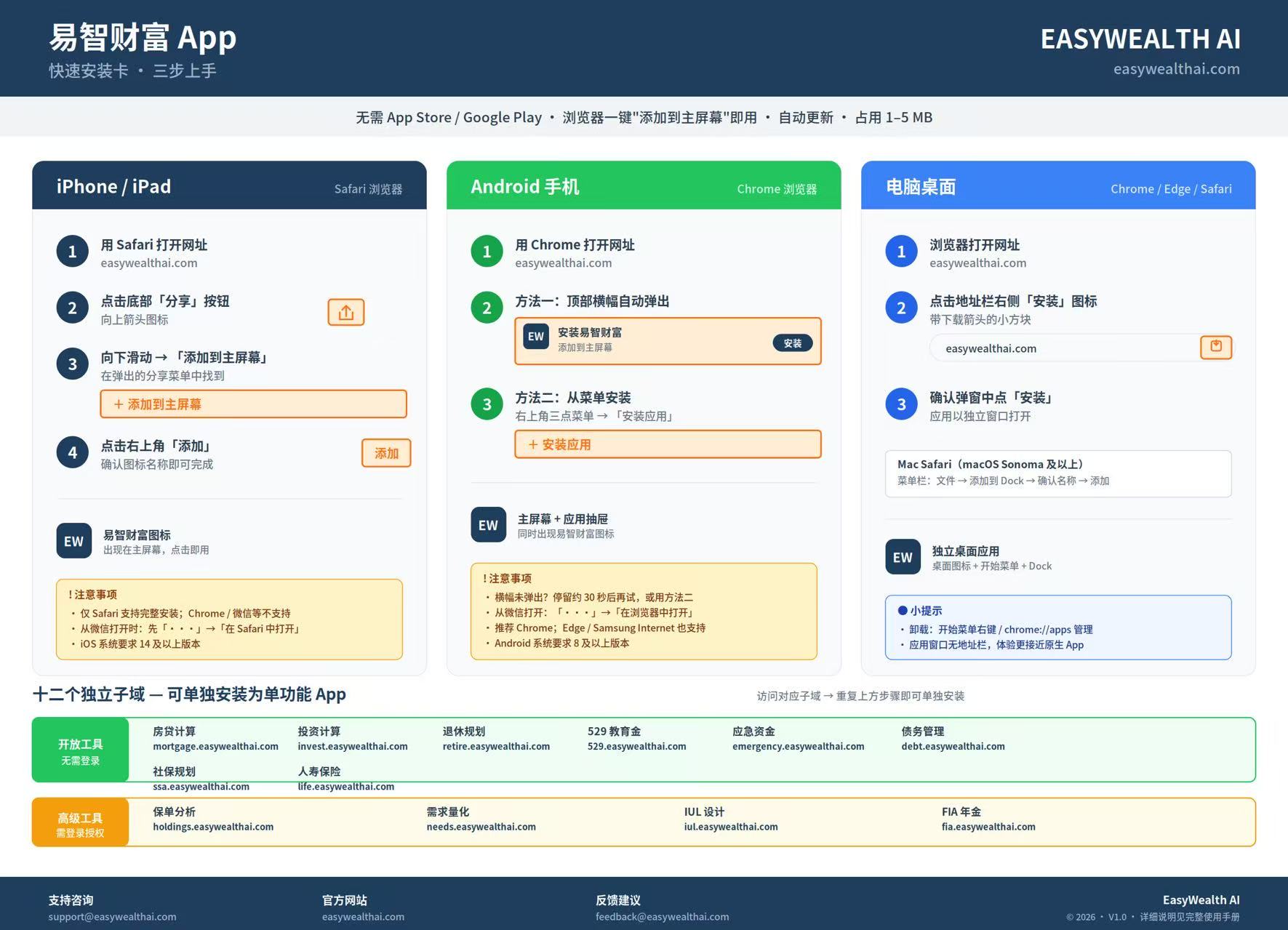
iPhone 与 iPad 用户必须使用 Safari 浏览器进行安装。其他浏览器(含微信、Chrome、UC 等)不支持"添加到主屏幕"功能。
图 1 iOS Safari 安装步骤一览(点击查看大图)
8.1 安装步骤
步骤 ① 在 Safari 中打开网址
-
打开 iPhone / iPad 上的 Safari 浏览器
-
在地址栏输入 easywealthai.com 并访问
-
等待页面完全加载(首次加载约 2-3 秒)
步骤 ② 选择"添加到主屏幕"
-
点击 Safari 浏览器底部中央的"分享"按钮(向上箭头图标)
-
在弹出的分享菜单中向下滑动
-
找到并点击"添加到主屏幕"(Add to Home Screen)选项
步骤 ③ 确认并添加
-
在确认页面,您可以修改图标显示的名称(默认为"易智财富")
-
点击屏幕右上角的"添加"按钮
-
返回主屏幕,将看到易智财富图标已成功添加
8.2 特殊情况处理
从微信或其它 App 中收到链接时
如果您是通过微信、邮件等 App 内置浏览器打开本站链接,需要先用 Safari 重新打开:
-
点击微信内浏览器右上角的"···"菜单
-
选择"在 Safari 中打开"(或复制链接后在 Safari 粘贴访问)
-
按 6.1 节步骤完成安装
使用其它 iOS 浏览器(如 Chrome、Edge)
iOS 系统下,仅 Safari 支持完整的 PWA 安装。其它浏览器的"添加到主屏幕"会创建普通网页快捷方式,不具备独立窗口、离线访问等 PWA 特性。建议统一使用 Safari 安装。
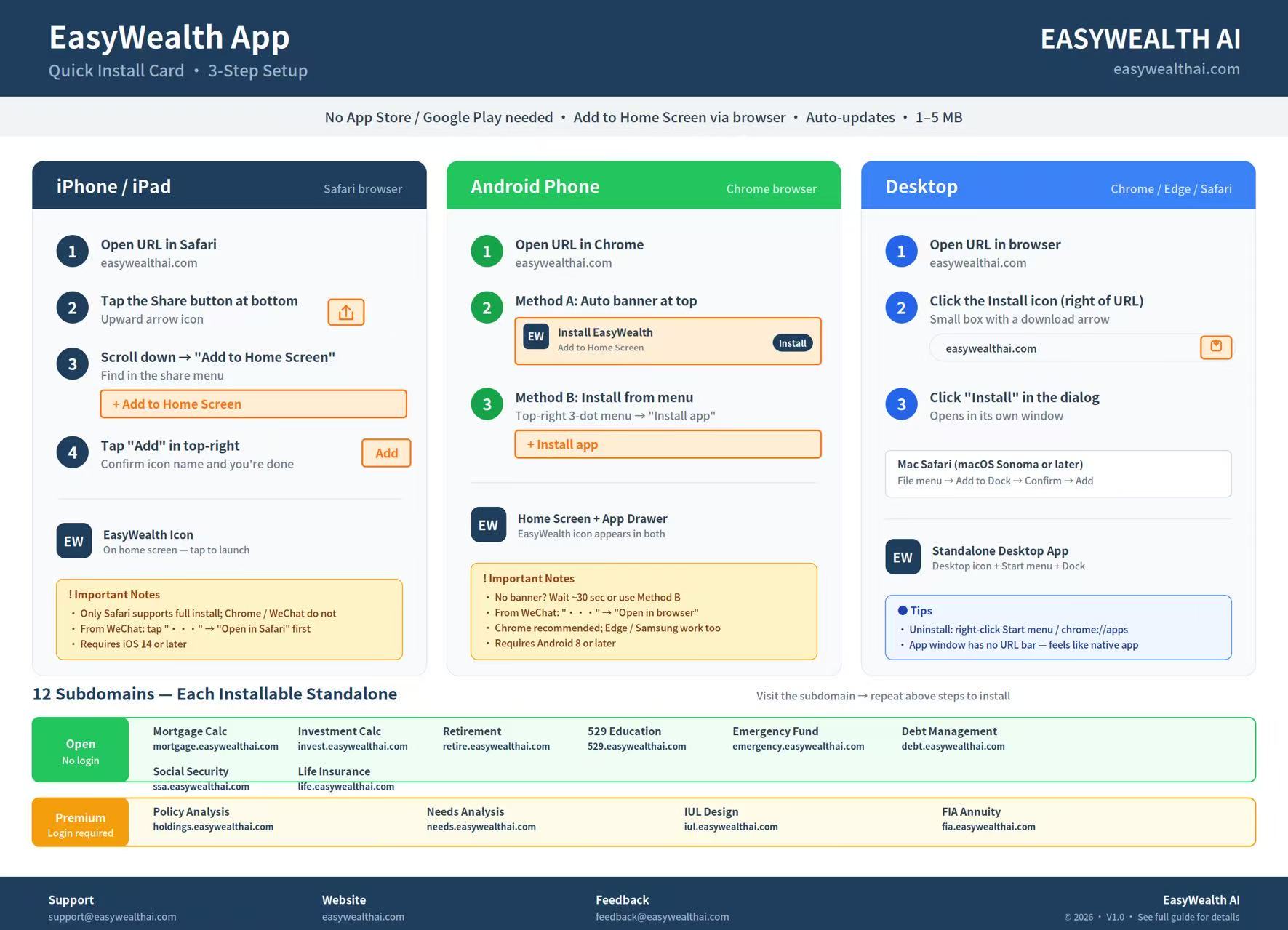
iPhone and iPad users must use Safari to install. In-app browsers (such as WeChat, Gmail in-app view) and third-party browsers (Chrome, Edge, Firefox on iOS) do not support full PWA installation.
Fig. 1 iOS Safari installation overview
8.1 Installation Steps
Step ① Open the URL in Safari
-
Open the Safari browser on your iPhone or iPad
-
Enter easywealthai.com in the address bar and visit
-
Wait for the page to fully load (about 2 – 3 seconds on first visit)
Step ② Select "Add to Home Screen"
-
Tap the Share button (upward arrow icon) at the bottom of Safari
-
Scroll down in the share menu that pops up
-
Find and tap "Add to Home Screen"
Step ③ Confirm and Add
-
On the confirmation page, you may edit the displayed icon name (defaults to "EasyWealth")
-
Tap "Add" in the top-right corner
-
Return to your home screen — the EasyWealth icon is now installed
8.2 Special Cases
Opened from WeChat, Gmail or other in-app browsers
If you received the link inside an app such as WeChat or Gmail, you must first reopen it in Safari:
-
Tap the "···" menu in the in-app browser
-
Select "Open in Safari" (or copy the link and paste into Safari)
-
Then follow Section 6.1 to install
Other iOS Browsers (Chrome, Edge, etc.)
On iOS, only Safari supports full PWA installation. Other browsers offer a basic "Add to Home Screen" that creates a simple web shortcut without independent window or offline features. Always use Safari for the best experience.
九、Android 手机安装方法(Chrome) 9. Android Installation (Chrome)
Android 用户推荐使用 Chrome 浏览器,安装过程比 iOS 更简单。其它支持 PWA 的浏览器(如 Edge、Samsung Internet、火狐)也可使用,操作类似。
图 2 Android Chrome 安装方法对比
9.1 方法一:自动横幅安装(推荐)
-
打开 Android 手机的 Chrome 浏览器
-
页面加载后,顶部会自动弹出"安装易智财富"横幅
-
点击横幅右侧的"安装"按钮
-
在系统弹出的确认窗口点击"安装"
-
安装完成后,应用图标会出现在主屏幕与应用抽屉中
9.2 方法二:从菜单手动安装
如果未自动弹出安装横幅(部分情况会被系统延迟显示),可以从浏览器菜单手动触发:
-
在 easywealthai.com 页面,点击 Chrome 右上角的三点(⋮)菜单
-
在下拉菜单中找到"安装应用"或"添加到主屏幕"选项
-
点击进入确认页面
-
确认应用名称后点击"安装"
9.3 通过微信打开时的处理
微信内置浏览器不支持 PWA 安装。如您是从微信中收到链接:
-
点击微信右上角的"···"菜单
-
选择"在浏览器中打开",会自动调用系统 Chrome 打开
-
在 Chrome 中按上述方法一或方法二完成安装
9.4 关于通知权限
Android 系统会在您首次访问时询问是否允许通知。开启后,您可以收到平台的重要提醒(如月度报告生成、保单审视提醒等)。如不需要,可在系统设置中关闭。
Android users should use Chrome — installation is simpler than on iOS. Other PWA-capable browsers (Edge, Samsung Internet, Firefox) work similarly.
Fig. 2 Two installation methods on Android Chrome
9.1 Method A — Auto Banner (recommended)
-
Open Chrome on your Android device
-
Visit easywealthai.com
-
After the page loads, an "Install EasyWealth" banner appears at the top
-
Tap the "Install" button on the right of the banner
-
In the system confirmation dialog, tap "Install"
-
The app icon appears on your home screen and in the app drawer
9.2 Method B — Install via Menu
If no banner appears (sometimes Chrome delays the prompt), trigger it manually:
-
On easywealthai.com, tap the three-dot (⋮) menu in the top-right of Chrome
-
Find "Install app" or "Add to Home Screen" in the dropdown
-
Tap to open the confirmation dialog
-
Confirm the app name and tap "Install"
9.3 Opening from WeChat
WeChat's in-app browser does not support PWA installation. If you received the link in WeChat:
-
Tap the "···" menu in the WeChat top-right
-
Select "Open in browser" — Chrome will launch automatically
-
Use Method A or B above to install
9.4 Notification Permission
Android will ask whether to allow notifications on first visit. Enabling notifications lets EasyWealth send important reminders (e.g., monthly report ready, policy review due). You can change this at any time in system settings.
十、电脑桌面安装(Chrome / Edge / Safari) 10. Desktop Installation (Chrome / Edge / Safari)
在 Windows、Mac、Linux 等桌面操作系统上,也可以将易智财富安装为独立应用。安装后,应用以独立窗口运行(不显示浏览器地址栏与标签页),桌面、开始菜单或应用程序文件夹会出现独立图标。
图 3 桌面浏览器安装位置与十二个工具子域结构
10.1 Chrome / Edge 安装步骤
-
打开 Chrome 或 Edge 浏览器
-
页面加载完成后,地址栏右侧会出现一个"安装"图标(一个带下载箭头的小方块)
-
点击该图标
-
在弹出的确认窗口中点击"安装"
-
安装完成后会自动打开独立应用窗口
10.2 Mac Safari 安装步骤(macOS Sonoma 及以上)
-
在 Safari 中访问 easywealthai.com
-
点击菜单栏的"文件"(File)→"添加到 Dock"(Add to Dock)
-
确认名称后点击"添加"
-
应用图标会出现在 Dock 与启动台中
10.3 卸载方式
-
Windows:右键单击开始菜单中的"易智财富",选择"卸载"
-
Mac:从启动台中将图标拖到废纸篓,或在"应用程序"文件夹中删除
-
Chrome / Edge:浏览器地址栏 chrome://apps 或 edge://apps 中右键卸载
On Windows, macOS and Linux, EasyWealth can also be installed as a standalone application. Once installed, it runs in its own window (without browser address bar or tabs), with an icon added to your desktop, Start menu or Applications folder.
Fig. 3 Desktop install location and the 12 tool subdomains
10.1 Chrome / Edge
-
Open Chrome or Edge
-
Visit easywealthai.com
-
After the page loads, an Install icon (a small box with a download arrow) appears at the right end of the address bar
-
Click the Install icon
-
In the confirmation dialog, click "Install"
-
The standalone app window will open automatically
10.2 Mac Safari (macOS Sonoma or later)
-
Open easywealthai.com in Safari
-
From the menu bar choose File → Add to Dock
-
Confirm the name and click Add
-
The app icon will appear in the Dock and Launchpad
10.3 Uninstalling
-
Windows: Right-click "EasyWealth" in the Start menu → Uninstall
-
Mac: Drag the icon from Launchpad to the Trash, or delete from the Applications folder
-
Chrome / Edge: Visit chrome://apps or edge://apps, right-click the icon and remove
十一、工具子域 — 单独安装 11. Tool Subdomains — Standalone Install
易智财富的每个工具都拥有独立的子域名与独立的 PWA 安装能力。这意味着您可以根据自己的使用习惯,单独把常用工具安装为独立的 App 图标。
例如,您可以只安装"529 教育金",把它放在主屏幕,点击图标直接进入该计算器,而不必每次都经过主站。
11.1 可单独安装的子域
| 类别 | 子域 | 是否需要登录 |
|---|---|---|
| 核心分析 | holdings(产品测评)、needs(需求分析)、iul(IUL 解读器)、fia(FIA 解读器) | 需登录 |
| 理财计算器 | mortgage、invest、retire、529、emergency、debt、ssa、life | 无需登录,可离线 |
完整地址与功能说明见第三章。
11.2 安装步骤
每个子域的安装步骤与主站完全相同,只需在浏览器中访问对应子域地址,再按本说明第六、七、八章的步骤操作即可。
安装后每个子域都会作为独立 App 出现在您的设备上,拥有独立的图标、名称(如"易智财富 · 529 教育金")和启动入口。
11.3 AI 账务是否可以单独安装
AI 账务不是独立子域,它位于主站 /ledger/ 路径下。请安装主站 App,安装后从主屏图标启动,左侧功能栏第一项即是 AI 账务。iPhone 用户必须通过这种方式安装,才能接收记账提醒。
Every EasyWealth tool has its own subdomain and can be installed as a standalone PWA, so you can put just the tools you use most on your home screen as separate icons.
For example, you may install the 529 College tool by itself, so tapping its icon takes you straight to the calculator without going through the main site.
11.1 Subdomains You Can Install
| Category | Subdomains | Sign-in |
|---|---|---|
| Core analysis | holdings, needs, iul, fia | Required |
| Calculators | mortgage, invest, retire, 529, emergency, debt, ssa, life | Not required, works offline |
Full addresses and descriptions are in Section 3.
11.2 Installation Steps
Installing a subdomain is identical to installing the main site — visit the subdomain URL in your browser and follow the steps in Sections 6, 7 or 8.
Once installed, each subdomain becomes an independent app with its own icon, name (e.g. "EasyWealth · 529 College") and launch entry.
11.3 Can the AI Ledger Be Installed on Its Own?
The AI Ledger is not a separate subdomain; it lives on the main site under /ledger/. Install the main site app and launch it from the home screen icon — AI Ledger is the first item in the left sidebar. iPhone users must install it this way in order to receive ledger reminders.
十二、常见问题与故障排查 12. Frequently Asked Questions
Q1:从微信打开链接后无法安装?
A:微信内置浏览器(X5 内核)不支持 PWA 安装。请点击微信右上角"···"菜单,选择"在浏览器中打开"(iOS)或"在 Chrome 中打开"(Android),然后按本说明步骤安装。
Q2:iPhone 没有看到"添加到主屏幕"选项?
A:检查您是否使用 Safari 浏览器。Chrome、Edge、UC、微信等浏览器在 iOS 上不支持 PWA 完整安装。同时请确保 iOS 系统版本在 14 以上。
Q3:Android Chrome 没有弹出安装横幅?
A:横幅显示有以下前置条件:(1)使用最新版 Chrome;(2)当次会话停留页面超过约 30 秒;(3)此前 90 天内未关闭过该站的横幅。即使横幅未弹出,您也可以从右上角三点菜单中手动选择"安装应用"。
Q4:连接银行安全吗?
A:连接通过 Plaid 完成,授权为只读,无法发起任何转账或扣款。您的网银用户名与密码直接提交给 Plaid 与银行,易智财富不接触也不保存;授权令牌在我们的数据库中加密存储。您可以在连接列表中随时点"断开"解除授权。
Q5:为什么有些交易直接入账,有些要我确认?
A:AI 对每笔交易的方向与类别都会给出把握程度。把握足够高的直接入账;把握不足或涉及需谨慎处理的类别,进入待确认队列请您看一眼。您在快捷记账时自己选定类别的,视为已确认,不进队列。每次修正都会被系统记住,用几轮之后自动入账比例会明显上升。
Q6:同一笔交易会不会被重复记两次?
A:通常不会。系统有两层去重,分别管两条路径:银行自动同步按银行给出的交易编号比对;对账单导入按商家、金额与日期,与已经入账的记录比对。所以自动同步与对账单导入即使覆盖了同一段时间,重叠的部分会被拦下。
有一种情况会保留两条:同一天真的发生了两笔商家与金额完全相同的交易,比如分两次各存 150 元现金。系统按两笔真实交易处理,不做合并——如果确实是重复,可以在流水页把其中一条删掉。
Q7:断开银行连接后,已记的账还在吗?
A:在。断开只是解除后续的数据同步授权,已入账的历史交易、分类与月报都完整保留。
Q8:家庭和公司的账怎么分开?
A:在银行连接列表中为每个连接设定一次"归属"(家庭或某个公司主体),此后该连接下的新交易自动继承;对账单导入时也可指定。单笔交易可在待确认页或流水页改派,手工改派过的不会被自动覆盖。详见 2.4。
Q9:AI 账务导出的报税资料可以直接拿去报税吗?
A:报税相关项目仅为记录归集,方便您和 CPA 整理,不构成税务建议。平台只汇总金额,不办理工资单、941、W-2 等申报事务,最终申报请由您的 CPA 确认。
Q10:需要提供社会安全号(SSN)吗?
A:个人用户不需要。系统不向个人用户收集 SSN,您也可以使用化名账户管理自己的财务资料。仅职业顾问需按合规要求提供执业相关信息。
Q11:安装的子域 App 打开后却跳到主站?
A:这是早期版本的已知问题,已在 V1.1 修复(manifest scope 调整)。请:(1)卸载该子域的 PWA;(2)清除浏览器对该子域的缓存;(3)重新访问该子域并安装。
Q12:图标显示为浏览器默认图标,不是易智财富 Logo?
A:通常是安装时图标资源未完全加载。请尝试:(1)卸载重装;(2)首次加载时确保网络稳定;(3)如问题持续,请联系支持团队(见下一章)。
Q13:安装后离线打开提示"无法连接"?
A:PWA 的离线能力仅覆盖 8 个理财计算器、您已访问过的页面与已生成的报告。首次安装后建议联网完整打开一次主要页面,使系统将其加入本地缓存。记账分类、银行同步、生成新报告等需要 AI 实时处理的功能始终需要联网。
Q14:如何卸载?
-
iPhone / iPad:在主屏幕长按图标 → 选择"删除 App"或"移除 App"
-
Android:长按图标 → 拖到顶部"卸载"或选择"卸载"
-
Windows / Mac:在开始菜单 / 启动台找到图标,右键卸载,或通过 chrome://apps / edge://apps 管理
Q15:账户数据存在哪里?卸载 App 后数据会丢失吗?
A:您的账户与数据保存在云端,与设备无关。卸载或更换设备后重新安装并登录,所有历史数据仍可访问。我们不会因为您卸载 App 而删除任何账户数据。如需删除,请在"账户设置 → 数据与导出"中申请。
Q16:如何更新到最新版本?
A:作为 PWA,易智财富会在您联网启动时自动加载最新版本,无需任何手动更新操作。
Q17:如何切换中英文?
A:点击页面右上角的语言切换按钮(EN / 中文)。系统会记住您的选择,并在首次访问时按浏览器默认语言自动判断。
Q1. I opened the link from WeChat but cannot install — why?
A: WeChat's in-app browser (X5 kernel) does not support PWA installation. Tap "···" in the top-right of WeChat and choose "Open in browser" (iOS) or "Open in Chrome" (Android), then follow this guide to install.
Q2. iPhone — I don't see "Add to Home Screen"
A: Make sure you are using Safari. Chrome, Edge, UC and WeChat on iOS do not support full PWA installation. Also verify your iOS version is 14 or later.
Q3. Android Chrome — no install banner appears
A: The banner requires (1) the latest Chrome, (2) at least ~30 seconds of engagement, and (3) that you have not dismissed the banner within the past 90 days. Even without the banner, you can install manually from the three-dot menu → "Install app".
Q4. Is connecting my bank safe?
A: The connection runs through Plaid and is read-only — no transfer or payment can be initiated. Your online banking credentials go directly to Plaid and your bank; EasyWealth never sees or stores them, and access tokens are stored encrypted in our database. You can revoke access at any time with "Disconnect" in the connection list.
Q5. Why are some transactions booked automatically and others need my confirmation?
A: The AI assigns a confidence level to the direction and category of every transaction. High confidence means it is booked directly; low confidence, or a category that calls for care, sends it to the review queue. Anything where you picked the category yourself is treated as confirmed. Every correction is remembered, so the auto-booked share rises noticeably after a few rounds.
Q6. Could the same transaction be recorded twice?
A: Usually not. Two layers of deduplication run, each covering one path: automatic bank sync compares the transaction ID supplied by your bank, while statement import compares merchant, amount and date against what is already recorded. So overlap between a sync and a statement covering the same period is filtered out.
One case is deliberately kept as two entries: when the same day genuinely contains two transactions with identical merchant and amount — say two separate $150 cash deposits. These are treated as two real transactions rather than merged. If it truly is a duplicate, delete one of them from the history page.
Q7. If I disconnect my bank, do my records stay?
A: Yes. Disconnecting only revokes future data sync. Transactions already recorded, their categories and your monthly reports are all preserved.
Q8. How do I separate family and business records?
A: Set the owner once for each bank connection (family, or a specific business entity); new transactions from that connection inherit it. You can also specify the owner when importing a statement, and reassign individual transactions from the review or history page — manual reassignments are never overwritten. See 2.4.
Q9. Can I file taxes directly from the ledger export?
A: Tax-related items are collected for record-keeping, to make preparation easier for you and your CPA — they are not tax advice. The platform aggregates amounts only and does not process payroll, Form 941 or W-2 filings. Your CPA should confirm the final return.
Q10. Do I need to provide a Social Security Number?
A: Not as an individual user. We do not collect SSNs from individual users, and you may use an alias account to manage your records. Only professional advisors provide practice-related information as required for compliance.
Q11. After installing a subdomain, opening it sends me to the main site
A: This was a known issue in early versions and was fixed in V1.1 (manifest scope adjusted). To resolve: (1) uninstall the subdomain PWA; (2) clear the browser cache for that subdomain; (3) revisit the subdomain and reinstall.
Q12. The icon shows a default browser icon instead of the EasyWealth logo
A: This usually happens when icon resources did not fully download during install. Try: (1) uninstall and reinstall; (2) ensure a stable network on first load; (3) if the problem persists, contact support (see the next section).
Q13. After installing, opening offline shows "Cannot connect"
A: Offline support covers the eight calculators, pages you have already loaded, and reports you have already generated. After installing, open the main pages once while online so they are cached locally. Live AI features — transaction categorization, bank sync, generating a new report — always need a connection.
Q14. How do I uninstall?
-
iPhone / iPad: long-press the icon on the home screen → "Delete App" or "Remove App"
-
Android: long-press the icon → drag to "Uninstall" at the top, or choose "Uninstall"
-
Windows / Mac: find the icon in the Start menu / Launchpad and right-click to uninstall, or manage via chrome://apps or edge://apps
Q15. Where is my data stored? Will I lose it if I uninstall?
A: Your account and data are stored in the cloud, independent of any device. Reinstall on any device, sign in, and your history is still there. Uninstalling does not delete anything. To delete your data, use Account Settings → Data and export.
Q16. How do I update to the latest version?
A: As a PWA, EasyWealth loads the latest version automatically whenever you launch it online — no manual updates required.
Q17. How do I switch between English and Chinese?
A: Tap the language switch (EN / 中文) at the top right of the page. Your choice is remembered, and the first visit follows your browser language.
十三、联系与支持 13. Support & Contact
13.1 客服与技术支持
如安装或使用过程中遇到本说明未覆盖的问题,可通过以下渠道联系我们:
-
官方邮箱:support@easywealthai.com
-
密码重置邮件发自:noreply@easywealthai.com(请勿直接回复该地址)
-
官方网站:easywealthai.com
-
支持时间:工作日(美东时间)9:00 - 18:00,48 小时内回复
13.2 隐私与数据保护
-
易智财富遵守 CCPA、CPRA、GDPR 及其他适用隐私法律
-
不向个人用户收集社会安全号(SSN);您可以使用化名账户管理自己的财务资料
-
银行连接为只读授权,授权令牌加密存储;我们不接触您的网银密码
-
您的数据由您控制:可随时导出全部数据,也可申请删除账户
-
AI 分析与人工销售相互独立;如存在推荐利益关系,会向您披露
-
完整隐私政策见 easywealthai.com/privacy
13.3 重要声明
易智财富提供的分析、评分与报告基于您提供的资料与公开的方法学,用于辅助您理解自身财务状况并做出判断,不构成投资、税务或法律建议,也不保证任何收益。涉及具体产品购买、税务申报或法律事务,请咨询持牌专业人士。
13.4 反馈与建议
我们持续改进产品体验。功能建议、问题反馈或合作意向,欢迎发送至 feedback@easywealthai.com。每条反馈我们都会认真阅读,重要反馈会得到团队亲自回复。
感谢您使用易智财富
让每一次财务决策都更智能、更安心
13.1 Customer Support
If you run into anything this guide does not cover, please reach us through:
-
Official support: support@easywealthai.com
-
Password reset emails come from: noreply@easywealthai.com (please do not reply to this address)
-
Website: easywealthai.com
-
Support hours: weekdays 9:00 - 18:00 Eastern Time, reply within 48 hours
13.2 Privacy and Data Protection
-
EasyWealth complies with CCPA, CPRA, GDPR and other applicable privacy laws
-
We do not collect Social Security Numbers from individual users, and you may use an alias account
-
Bank connections are read-only and access tokens are stored encrypted; we never see your banking password
-
Your data stays yours: export everything at any time, or request account deletion
-
AI analysis and human sales stay independent; any referral interest is disclosed to you
-
Full privacy policy: easywealthai.com/privacy
13.3 Important Notice
The analysis, scores and reports EasyWealth produces are based on the information you provide and on published methodology. They are intended to help you understand your own financial position and reach your own judgment. They are not investment, tax or legal advice, and no return is guaranteed. For product purchases, tax filings or legal matters, please consult a licensed professional.
13.4 Feedback and Suggestions
We keep improving the product. Feature suggestions, bug reports and partnership inquiries are welcome at feedback@easywealthai.com — every message is read by the team, and important ones receive personal replies.
Thank you for using EasyWealth
Make every financial decision smarter — and clearer.